Professional Lighting Control, Completely Free
Modern web-based DMX controller with ArtNet output - Community powered development and support
Built For You
Whether you're a mobile DJ, running a small venue, or a tech enthusiast - LightGroove has you covered
Mobile DJs
Lightweight, portable lighting control that runs on any laptop or tablet. Set up your light show in minutes and control it from your device's web browser. Control from any device on your network - phone, tablet, or laptop. No expensive dedicated hardware required, just your existing equipment and an ArtNet interface.
Small Venues
Professional-grade lighting control without the professional price tag. Perfect for bars, clubs, community theaters, and event spaces. Free software means you can invest in better lights instead of expensive licenses. Support for multiple universes and unlimited fixtures gives you room to grow.
Technology Enthusiasts
Open source architecture you can customize and extend. Full access to the Python codebase means you can add features, create integrations, and learn how modern lighting control works. Built with Flask and modern web technologies. Contribute to the project and help shape its future!
Why Choose LightGroove?
Professional lighting control that's free, open source, and built by the community
Completely Free
No licensing fees, no subscriptions, no hidden costs. Download and use forever at zero cost. No feature limitations or time restrictions.
Open Source
MIT licensed with full source code access. Modify, extend, and learn from the Python codebase. True transparency and community ownership.
Community Driven
Development and support powered by the lighting community. Your feedback directly shapes new features. Active development with regular updates.
Cross-Platform
Runs on Windows, macOS, and Linux. Access the web UI from any device on your network - desktop, tablet, or smartphone. One server, unlimited clients.
Easy Setup
Up and running in minutes with simple installers for Windows and macOS. Brew installation on macOS or source installation on any platform. No complex configuration required to get started.
No Compromise
Professional features including ArtNet output, real-time fader control, dynamic color effects, and web-based configuration. Free doesn't mean limited - get everything you need.
Powerful Features
Everything you need for professional lighting control
🌐 Web-Based Interface
Control your lights from any device with a web browser - desktop, laptop, tablet, or smartphone. One server, unlimited clients on your network.
🎨 Real-Time Fader Control
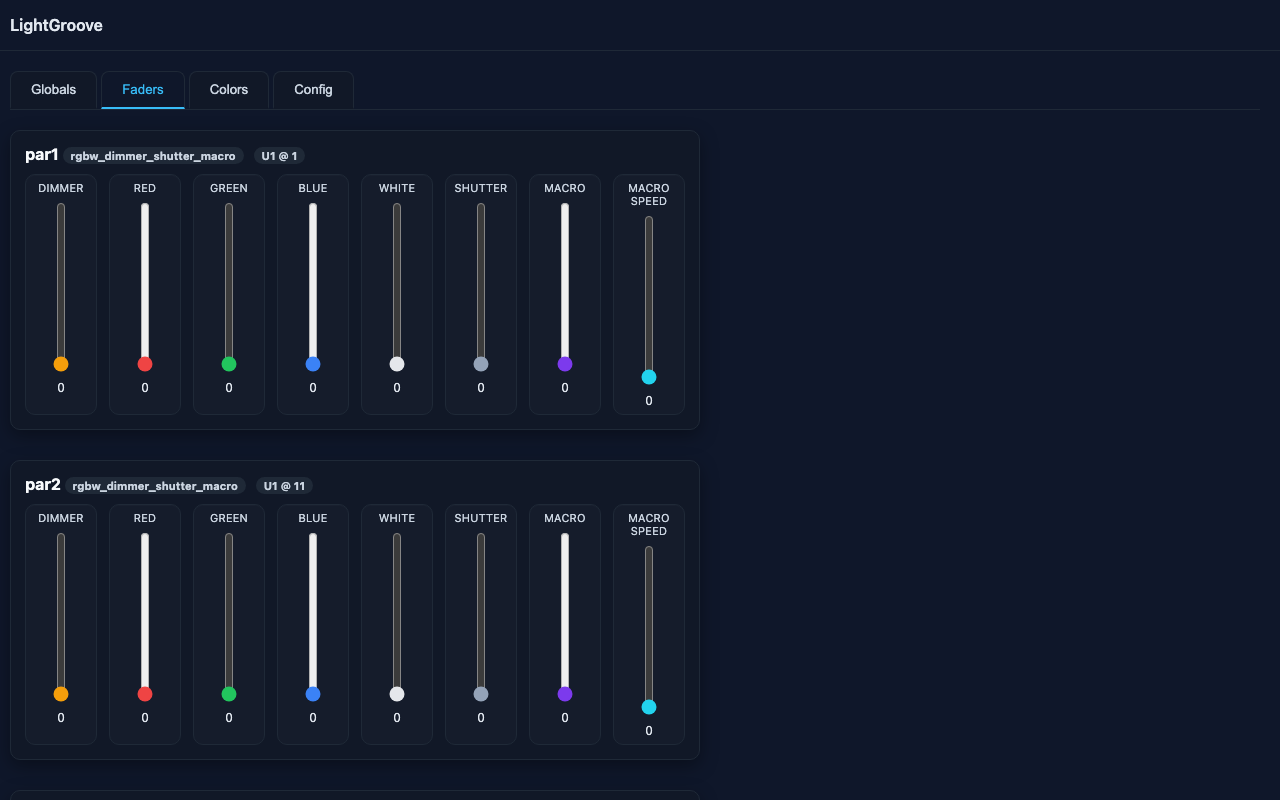
Vertical faders for every channel with live DMX value display (0-255). Compact fixture cards with intuitive channel layout. Responsive design adapts to any screen size.
🎯 Dynamic Color Effects
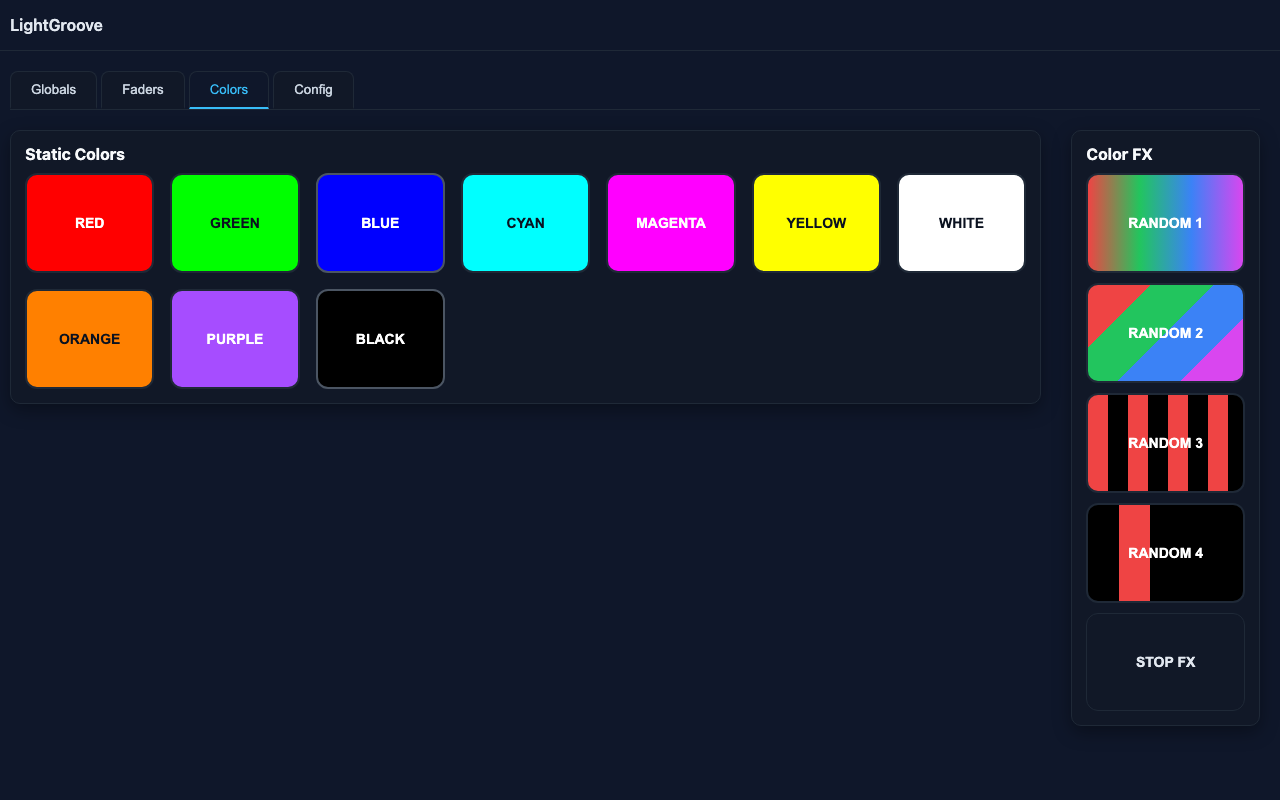
10 preset color buttons plus 4 programmable effects (Random 1-4) with adjustable BPM and fade times. Server-side effects run independently for rock-solid performance.
🎭 Moving Head Support
Full support for moving heads with color wheels. Automatic RGBW-to-color-wheel conversion with fixture-specific mappings. Seamless integration with color buttons and FX programs.
🎯 Movement Effects
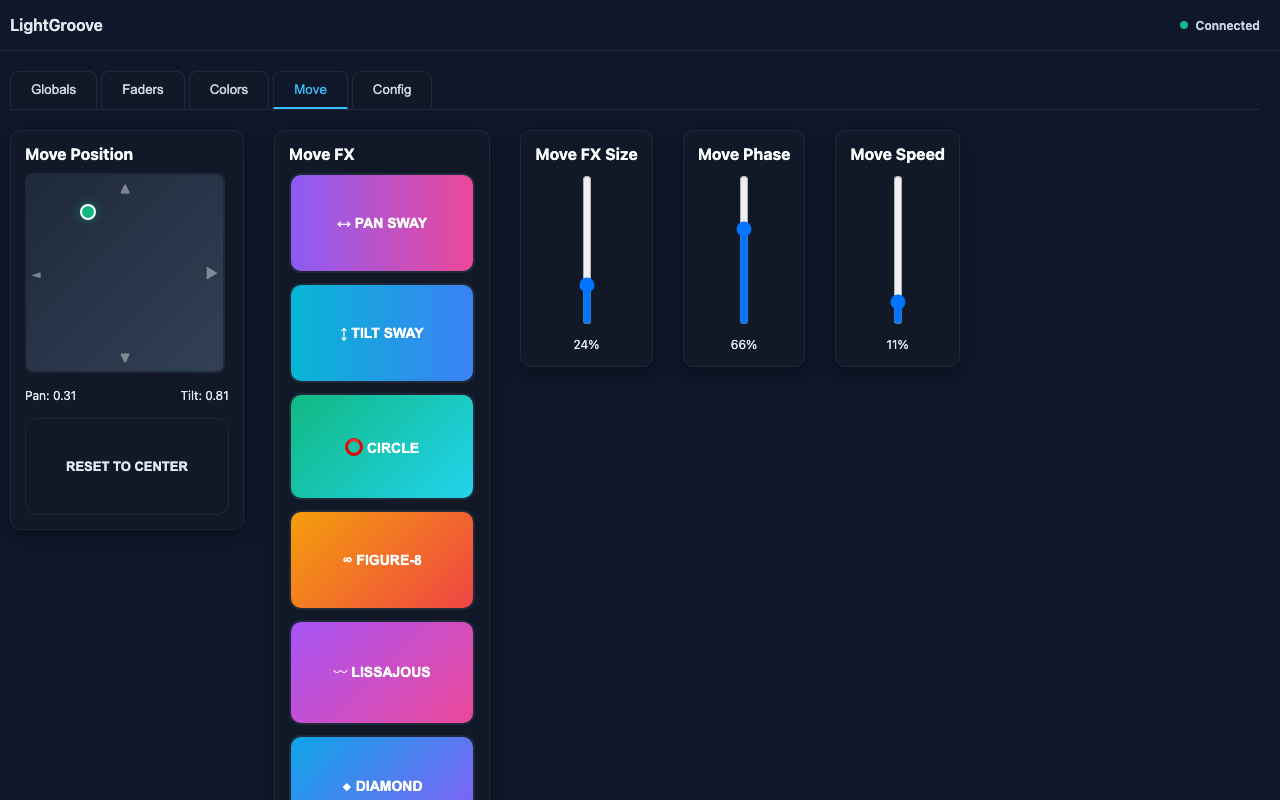
Professional X/Y touchpad for pan/tilt control with 6 movement effects (Pan Sway, Tilt Sway, Circle, Figure-8, Lissajous, Diamond). Adjustable effect size and BPM. Position control works even without effects running. All settings auto-save and restore.
📡 ArtNet Output
Send DMX via ArtNet protocol to any compatible interface. Support for multiple universes and nodes with flexible universe mapping. Works with Enttec ODE, DMXking, and other ArtNet-to-DMX converters.
⚡ Flash Button
Press and hold for instant full white override. Automatically pauses effects during flash and restores previous state on release. Works with both RGBW and color wheel fixtures.
🎚️ Master Fader
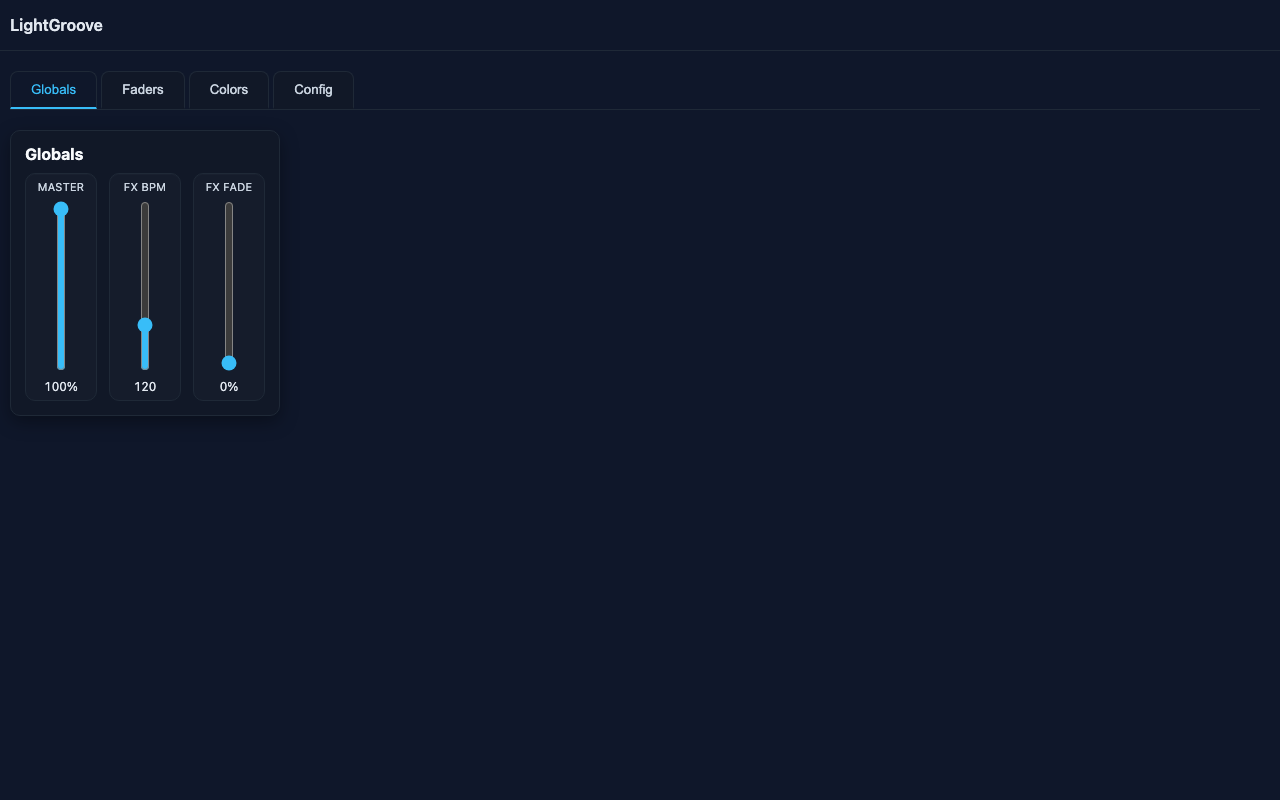
Global intensity control affects only dimmer channels (0-100%). Pan, tilt, and color wheel positions remain unchanged. Perfect for quick room brightness adjustments.
⚙️ Web Configuration
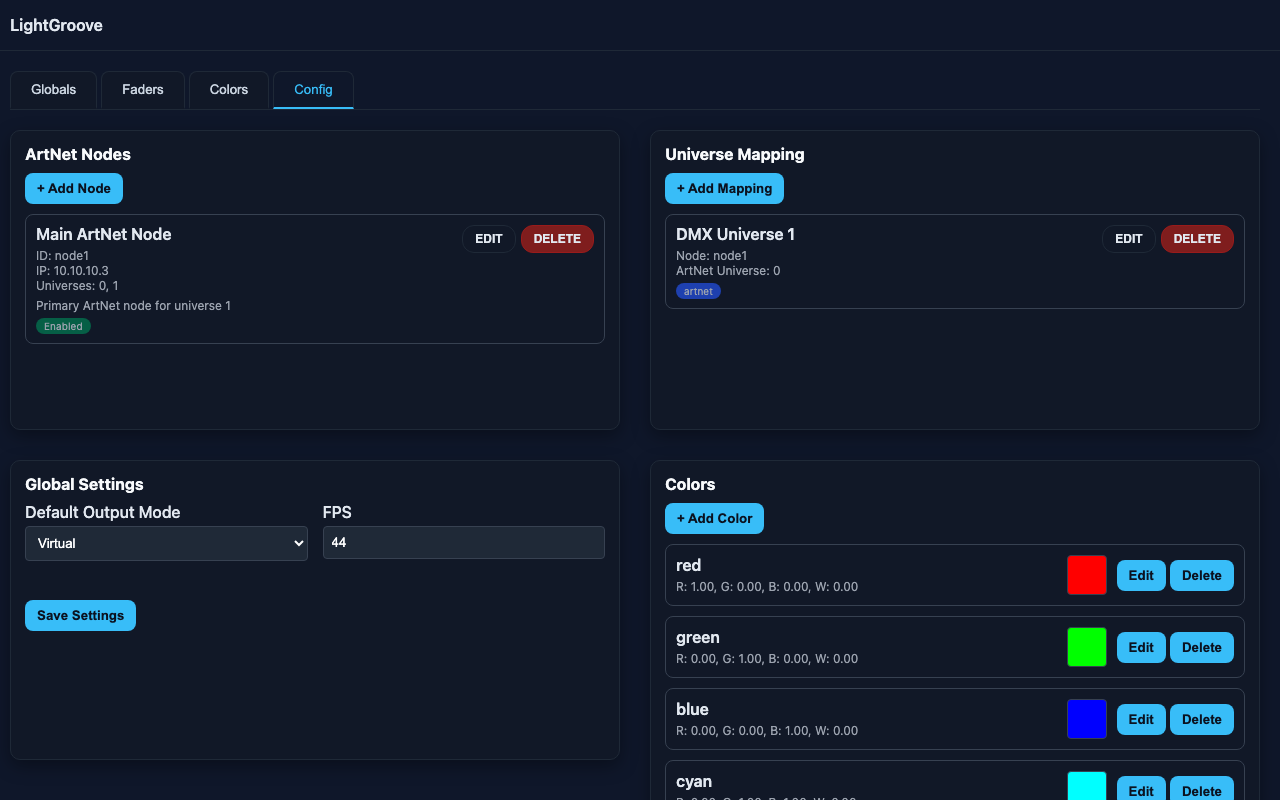
Configure everything through the web interface - no JSON editing required. Manage ArtNet nodes, universe mappings, and custom colors. Changes apply immediately without manual restart.
Everything you need to control your lighting setup professionally
Real-Time Control
Control every fixture with precision using intuitive web-based faders. See DMX values update in real-time (0-255) as you adjust. Responsive layout works on any screen size.
Color Effects
Built-in static colors and 4 dynamic effect modes. Random chase effects, synchronized color changes, and alternating strobe patterns. Smooth fade transitions for professional looks.
ArtNet Output
Send DMX via ArtNet to any compatible interface. Works with professional lighting equipment like Enttec ODE, DMXking, and other ArtNet nodes. Multiple universe support with flexible mapping.
Master Control
Global intensity scaling for all fixtures. Perfect for quick brightness adjustments during shows without changing individual fader positions. Real-time response.
BPM Sync
Sync color effects to your desired tempo from 1-480 BPM. Adjustable fade time (0-100%) for smooth color transitions. Perfect timing for music-synchronized lighting.
Web Config
Configure everything through the web interface. Add ArtNet nodes, edit colors with live preview, map universes, and adjust global settings. Changes apply immediately with automatic reload - no manual restart needed.
Flash Button
Press and hold for instant full white override. Automatically pauses running effects. Perfect for attention-grabbing moments or emergency lighting. Touch-friendly for mobile control.
Connection Recovery
Real-time connection status monitoring. Automatic UI recovery when server reconnects. Seamless continuation of operations - no manual intervention required.
Beautiful Interface
Clean, modern design that makes lighting control intuitive and enjoyable
Quick Installation
Get up and running in minutes
🍎 macOS
Install via Homebrew:
brew tap oliverbyte/lightgroove \
  https://github.com/oliverbyte/lightgroove.git
brew install --HEAD \
  oliverbyte/lightgroove/lightgroove
lightgroove
🐍 From Source
For developers and contributors:
git clone https://github.com/oliverbyte/lightgroove.git
cd lightgroove
python -m venv .venv
source .venv/bin/activate
pip install -r requirements.txt
python main.py