Features
LightGroove provides professional-grade lighting control with an intuitive web interface. Control your fixtures in real-time, create dynamic effects, and configure everything through your browser.
DMX / ArtNet Output
- ArtNet Protocol Support - Sends lighting data via industry-standard ArtNet protocol to any compatible network node or monitoring software
- Universal Compatibility - Works seamlessly with any ArtNet-to-DMX interface including Enttec ODE, DMXking, Art-Net 4, and similar professional devices
- Flexible Universe Mapping - Map any DMX universe to any ArtNet node and universe through the web UI (e.g., DMX universe 1 → ArtNet node 192.168.1.100 universe 0)
- Multiple Node Support - Send to multiple ArtNet nodes simultaneously on different network addresses for large installations
- Configurable Frame Rate - Adjust output FPS for optimal performance based on your setup
Web-Based User Interface
Globals Tab
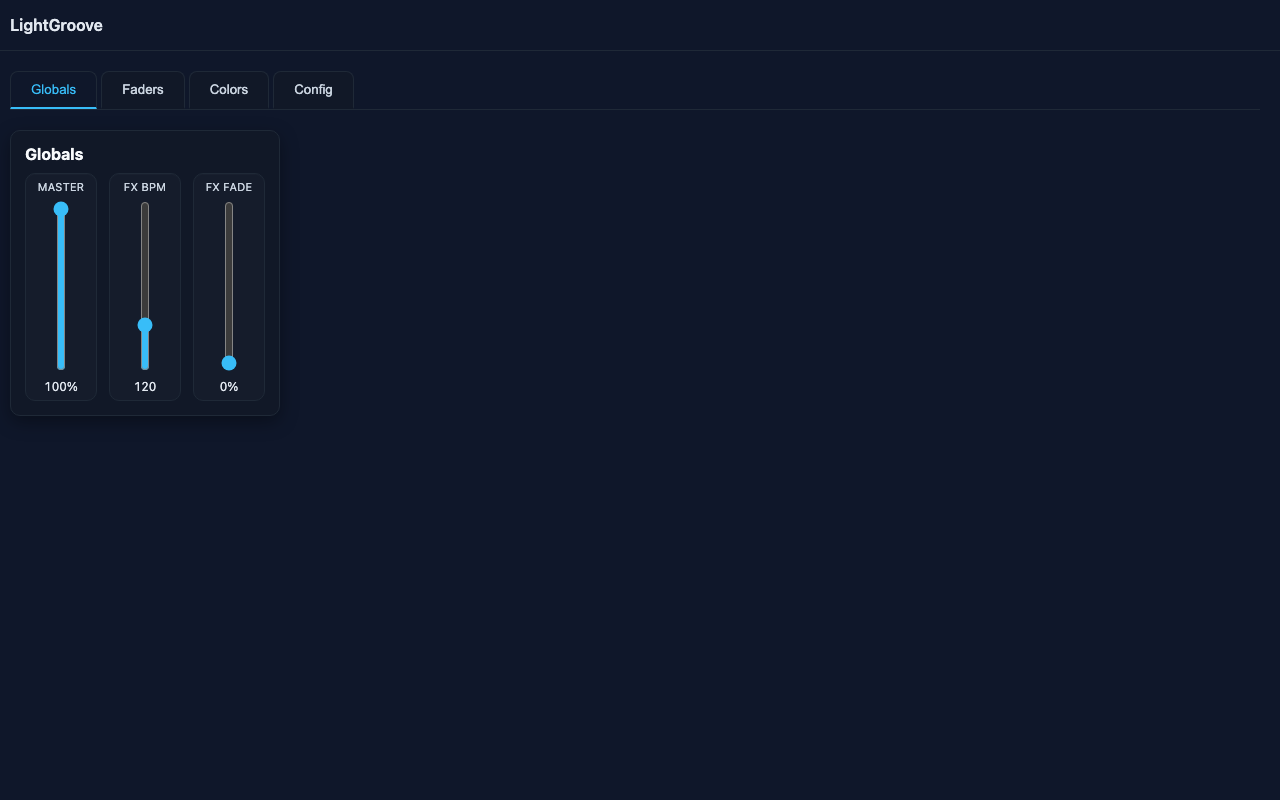
- Master Fader - Global intensity control (0-100%) that scales all DMX output in real-time without changing individual fader positions. Perfect for room brightness adjustments during shows.
- FX BPM Control - Set the speed of color effects from 1-480 beats per minute for perfect music synchronization. From slow ambient (1 BPM) to fast strobing (480 BPM).
- FX Fade - Adjust smooth color transitions from instant (0%) to full beat interval (100%). Create professional-looking crossfades between colors.
- Flash Button - Press and hold for instant full white override. Automatically pauses running effects. Releases back to previous state. Touch-friendly for mobile control.
Faders Tab
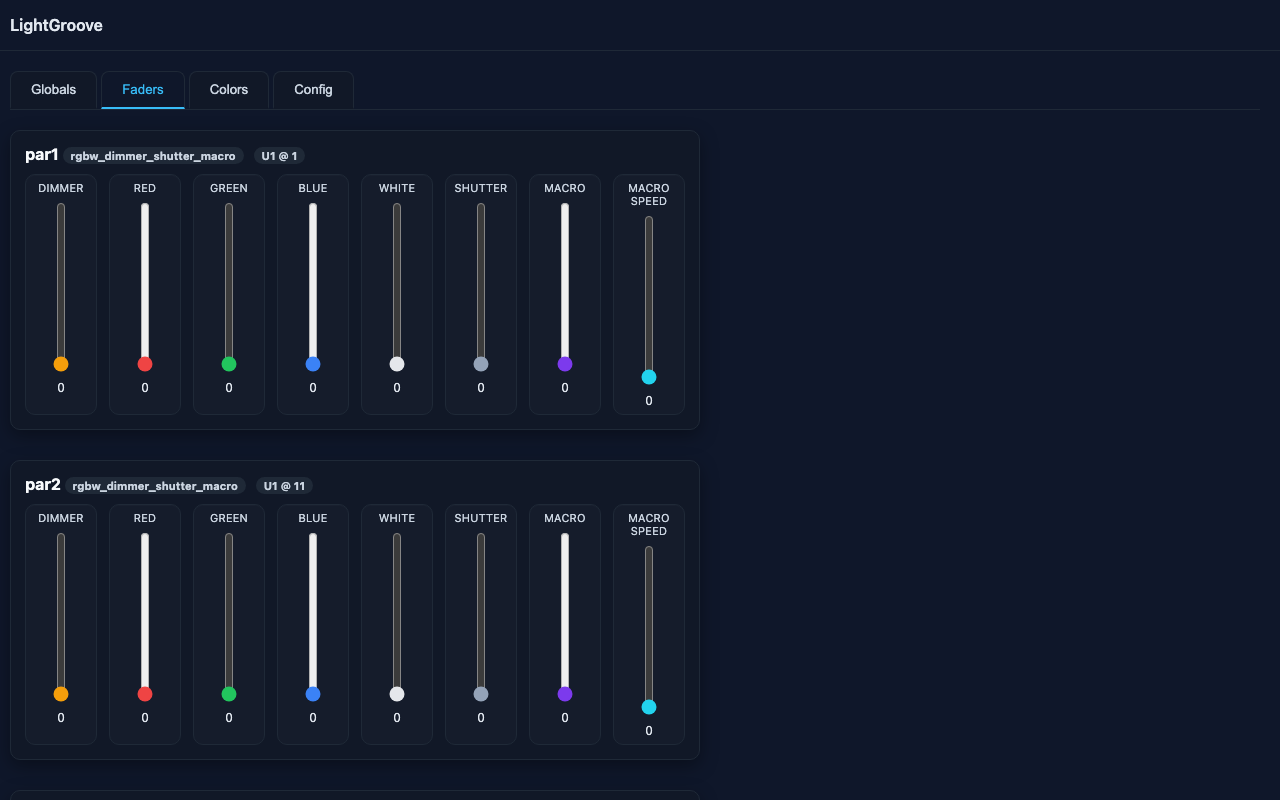
- Compact Fixture Cards - Clean, organized layout showing each patched fixture with all its channels in one place
- Vertical Faders - Intuitive faders arranged in logical channel order (Dimmer, Red, Green, Blue, White) for precise control
- Real-Time DMX Values - Live DMX values (0-255) displayed and updated instantly as you move faders
- Responsive Layout - Automatically adapts to your screen width - works perfectly on desktop, tablet, and phone
- Per-Channel Control - Independent control of every channel on every fixture for maximum flexibility
- Clear Labels - Each fader clearly labeled with channel name and fixture identifier
Colors Tab
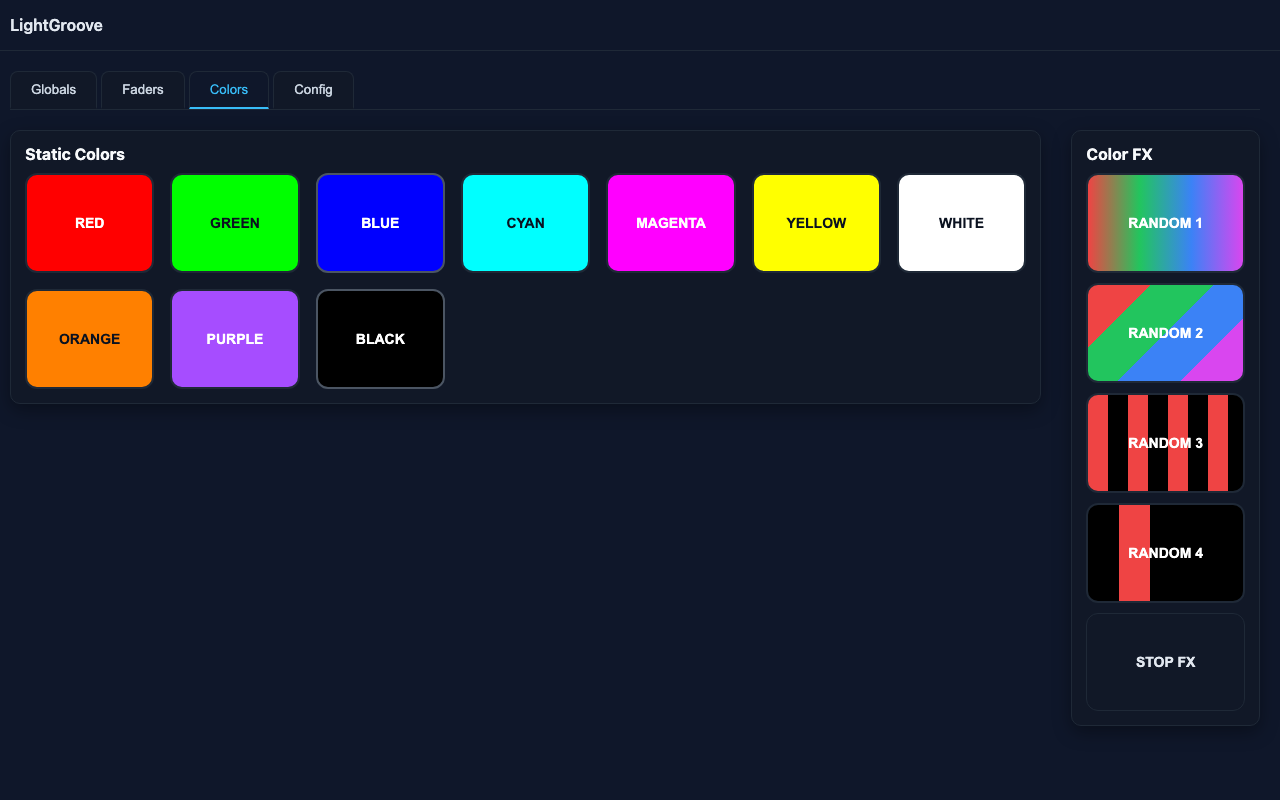
Static Colors
10 preset color buttons with instant one-click activation:
- Standard Colors - Red, Green, Blue, Cyan, Magenta, Yellow
- Additional Colors - White, Orange, Purple, Black (blackout)
- Customizable - All colors defined with RGBW values (0.0-1.0 range) in
config/colors.json - Dynamic Buttons - Button backgrounds automatically display the actual RGBW color from your definitions
- Active Indication - Currently active color highlighted with visual feedback
- Add Your Own - Create custom colors through the Config tab with live preview
Color FX (Server-Side Effects)
Dynamic effects that run independently on the server, synchronized to BPM:
- Random 1 - Unified color wash: All fixtures display the same random color, cycling together at BPM speed. Perfect for creating cohesive color changes across your entire rig.
- Random 2 - Disco ball effect: Each fixture gets a different random color, all changing simultaneously at each beat. Creates dynamic, multi-color looks.
- Random 3 - Strobe effect: Alternates between even-numbered and odd-numbered patches with black, creating a pulsing strobe-like pattern.
- Random 4 - Sequential chaser: Lights one fixture at a time in sequence with random colors. Classic chase effect with color variety.
- Smooth Fades - All effects support smooth fade transitions based on FX Fade setting (0-100%). Create professional crossfades instead of abrupt color changes.
- Active Indication - Effect buttons highlight to show what's currently running
- Multi-Color Display - Random 2/3/4 effects show all currently active colors in the button for visual feedback
- Flash Integration - Effects automatically pause when flash button is held, resuming when released
Move Tab
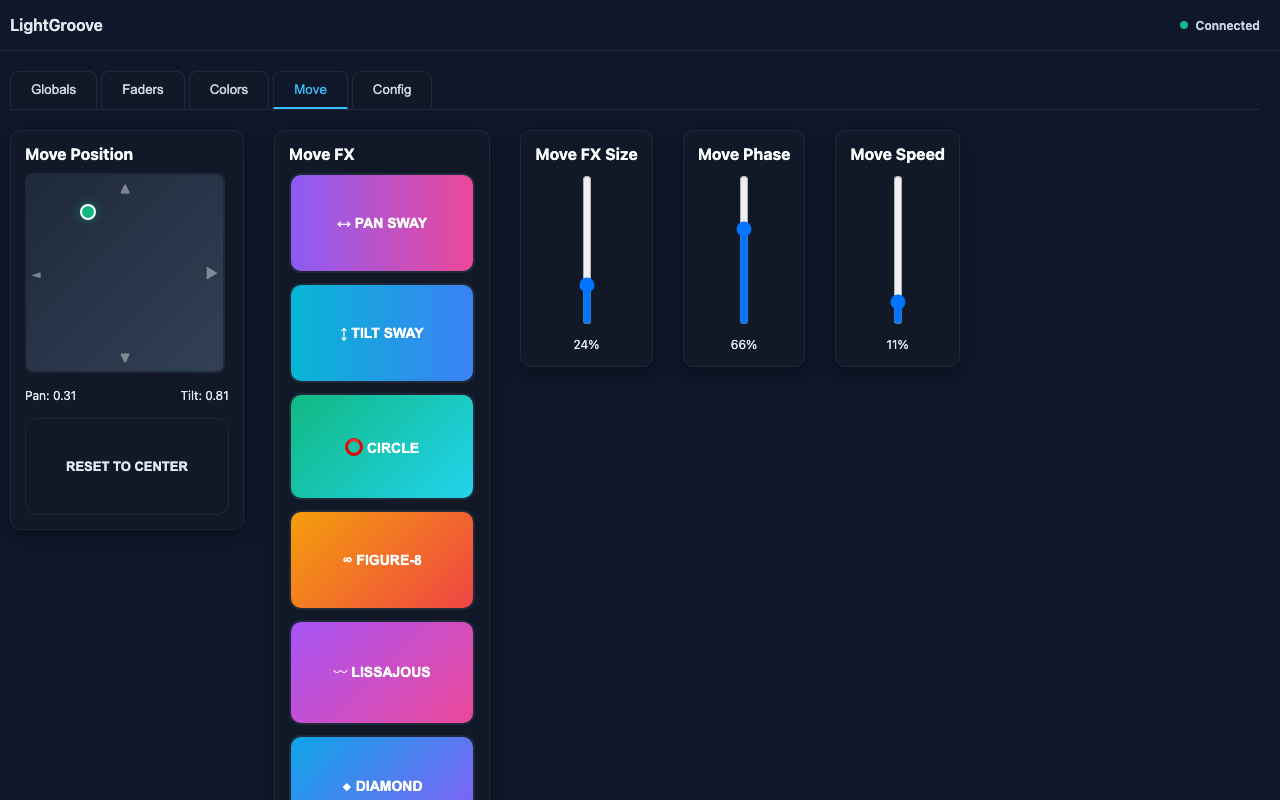
Professional moving head control with intuitive positioning and dynamic effects:
Move Position (X/Y Pad)
- Interactive Touchpad - 200x200px drag surface with visual cursor for pan/tilt positioning
- Dual Mode Operation - Works during effects (controls center position) and without effects (direct positioning)
- Real-Time Feedback - Live pan/tilt values displayed (0.00-1.00 range) as you drag
- Touch-Friendly - Fully supports touch input for mobile devices and tablets
- Reset to Center - Quick button to return to center position
- State Persistence - Position automatically saved and restored on app restart
Move FX Size
- Amplitude Control - Vertical slider controlling effect size (0-100%)
- 0% - No movement, fixtures remain at static position
- 100% - Full range movement (±50% from center position)
- Real-Time Adjustment - Change size while effects are running without interruption
- Automatic Persistence - Setting saved and restored automatically
Move Phase
- Multi-Fixture Phase Control - Vertical slider for phase offset (0-100%)
- 0% - All fixtures move in perfect sync (synchronized)
- 100% - Maximum phase spread creates wave-like patterns
- Professional Effects - Creates dynamic chase and wave patterns across multiple moving heads
- Per-Fixture Offset - Phase calculated based on fixture position in the list
- Universal Compatibility - Works with all movement patterns
- State Persistence - Automatically saved and restored
Move Speed
- Independent Speed Control - Vertical slider for movement speed multiplier (0-100%)
- 50% (Default) - Normal speed, uses global FX BPM setting
- 0-49% - Slower than BPM, divides movement speed
- 51-100% - Faster than BPM, multiplies movement speed
- Independent Control - Adjust move speed without affecting color effect speeds
- Real-Time Adjustment - Speed changes apply immediately while effects are running
- State Persistence - Setting automatically saved and restored
Movement Effects
Six professional movement patterns synchronized to BPM:
- Pan Sway - Smooth horizontal oscillation around center position. Perfect for sweeping side-to-side motion.
- Tilt Sway - Smooth vertical oscillation around center position. Creates up-and-down sweeping effects.
- Circle - Continuous circular motion around center point. Classic moving light effect.
- Figure-8 - Lemniscate pattern (infinity symbol). Complex mathematical curve for visual interest.
- Lissajous - Advanced mathematical curves (3:2 frequency ratio). Creates sophisticated patterns.
- Diamond - Sharp-cornered diamond shape using cubic power functions. Geometric precision.
- Center-Based - All effects use center position from X/Y pad as their origin
- No Freezing - BPM, size, and phase changes take effect immediately without stopping motion
- Phase Offset Support - All patterns support multi-fixture phase distribution
- Stop Button - Halt all movement effects and return to center position
State Persistence
- Comprehensive Saving - Position (pan/tilt), FX Size, Move Phase, Move Speed, and BPM all automatically saved
- Auto-Save Every 15 Seconds - Regular background saves prevent data loss
- Immediate Save on Change - Settings also saved instantly after any adjustment
- Automatic Restoration - All settings restored when application starts
- Position Memory - Moving heads return to last known position on restart
Config Tab
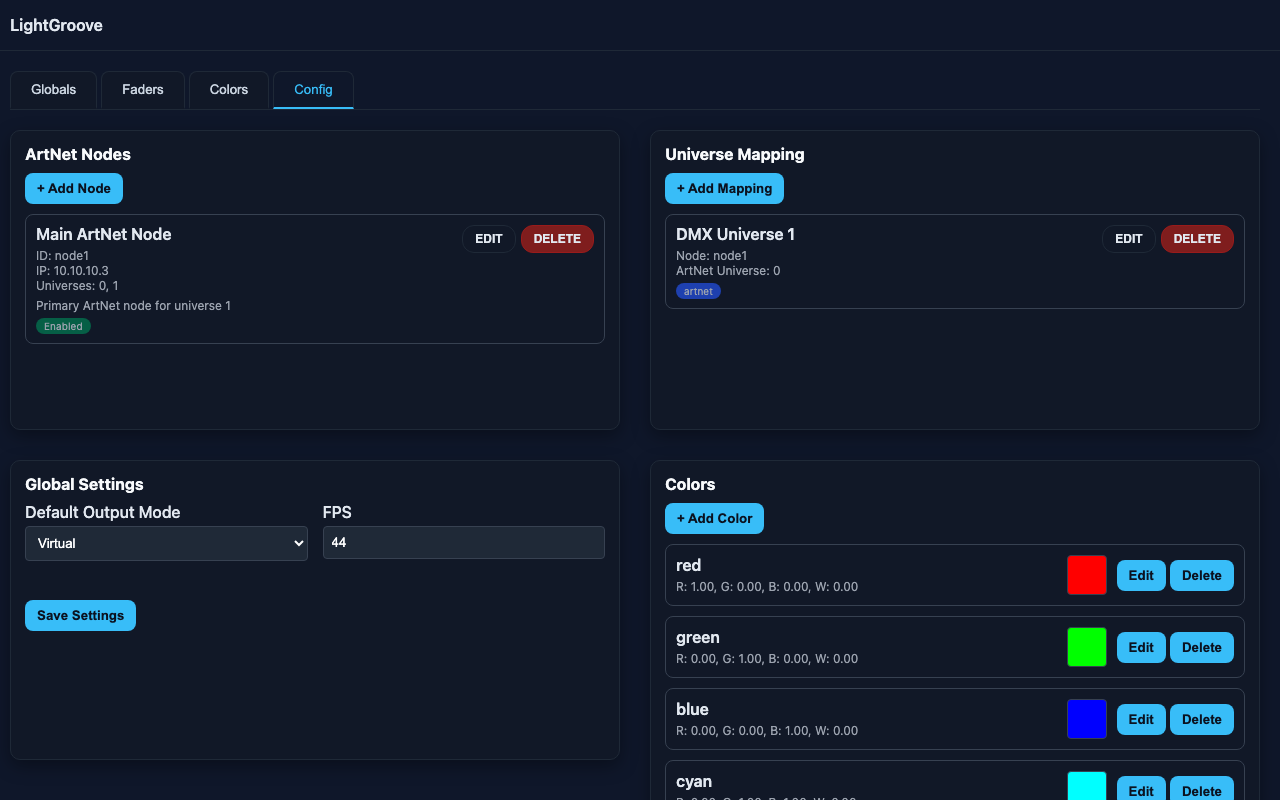
Complete web-based configuration system - no need to manually edit JSON files:
- ArtNet Nodes Management - Add, edit, and delete ArtNet output nodes with IP addresses and universe numbers. Visual list of all configured nodes with edit/delete buttons for each.
- Universe Mapping - Configure which DMX universe maps to which ArtNet node and universe. Easy dropdown selection for routing.
- Colors Editor - Full color management system:
- Edit RGBW color definitions using interactive sliders (0-1 range)
- Live color preview shows actual color as you adjust
- Add custom colors with any name you want
- Remove colors you don't need
- Changes immediately reflected in Colors tab buttons
- Global Settings - Configure system-wide options:
- Default output mode (ArtNet/virtual DMX)
- Frames per second (FPS) for DMX output timing
- Performance tuning options
- Automatic Reload - All changes are saved immediately and the server reloads automatically. No manual restart required!
- Zero Downtime - Continue working while configuration reloads. UI stays connected and operational.
Connection Monitoring & Recovery
- Real-Time Status - Visual connection indicator in header shows server status (green dot = connected, red pulsing = offline)
- Automatic Recovery - UI automatically detects when server comes back online and reloads all data
- Seamless Reconnection - No manual intervention needed - just keep working and the UI recovers automatically
- Zero User Action - No need to refresh browser or restart application after connection restore
Configuration System
Flexible configuration system supports both web UI and direct file editing:
config/fixtures.json- Fixture profiles with channel definitions- Define fixture types (RGBW, RGB, dimmer-only, custom)
- Specify channel names, types, and default values
- Create reusable fixture profiles
config/patch.json- Patched fixtures per universe- Assign fixtures to specific DMX addresses
- Organize fixtures across multiple universes
- Set per-fixture identifiers
config/artnet.json- ArtNet configuration (editable via Config tab)- Define ArtNet node IP addresses and universes
- Map DMX universes to ArtNet nodes
- Configure multiple output destinations
config/colors.json- Color definitions (editable via Config tab)- RGBW values 0.0-1.0 for each color
- Custom color names and presets
- Used by static color buttons and FX engine
Technical Features
- Real-Time Performance - Low-latency DMX output with configurable frame rate (FPS). Optimized Python backend ensures responsive control.
- Multiple Universes - Support for multiple DMX universes through ArtNet. Scale to hundreds of fixtures across many universes.
- Flexible Fixture Profiles - Define any fixture type with custom channel layouts. Support for RGBW, RGB, single-channel dimmers, and complex moving lights.
- Cross-Platform - Runs on Windows, macOS, and Linux. Python-based ensures compatibility across all major operating systems.
- Self-Contained - Built-in Flask web server, no separate web server or database required. Everything runs from a single Python process.
- RESTful API - Complete HTTP API for integration with other software, custom controllers, or automation systems.
- Network Accessible - Control from any device on your network. Server runs on port 5555, accessible via http://localhost:5555 or your computer's IP address.
- Modular Architecture - Clean separation between DMX controller, fixture manager, color FX engine, and HTTP API for easy customization and extension.
- AGPL-3.0 Licensed - Completely open source with strong copyleft. Use commercially, modify, and distribute freely while sharing source code of modifications.
Use Cases
- Mobile DJs - Portable lighting control running on a laptop. Control from tablet while DJing. Perfect for wedding receptions, parties, and mobile events.
- Small Venues - Affordable permanent installation for bars, clubs, and restaurants. No expensive lighting console required.
- Live Events & Performances - Small to medium events, concerts, and shows. Quick setup and intuitive control for event technicians.
- Theater Productions - Community theater and educational theater programs. Student productions and rehearsal spaces.
- House Parties & Private Events - Turn any space into a party venue. Easy enough for anyone to operate.
- Architectural Lighting - Permanent installations in commercial spaces, restaurants, or architectural features. Color-changing accent lighting.
- Development & Testing - Test DMX fixtures during development. Verify fixture channel layouts and color mixing.
- Education - Learn DMX lighting control concepts. Understand ArtNet protocol and lighting programming.
- Home Automation Integration - Integrate lighting control into smart home systems via the HTTP API.
What's Next?
LightGroove is actively developed with new features planned:
- MIDI Controller Support - Use physical MIDI controllers for tactile fader control
- Scene Presets - Save and recall complete lighting states
- Cue Lists - Program sequences of scenes with timing
- Timeline Programming - Time-based automation for shows
- Audio Reactive Effects - Effects that respond to music and sound input
- Additional Fixture Profiles - Growing library of pre-defined fixtures